
 Moodle Tip of the Week
April 28, 2020
Viewing the Gradebook as a Student
Viewing the Gradebook as a Student
? Question: Sometimes my students say they can't see something in the gradebook, but I can see it just fine. I have tried temporarily changing my role to a Student, but it's not the same as what a specific student sees. How can I see the Gradebook as they do?
√ Answer: There are a number of different views in the Gradebook, one of which is the User Report. This will show you what a specific student is seeing in the Gradebook. (If you notice that you don't see something that the students should be seeing, it may be that the settings for that activity require adjustment. Please feel free to reach out to us in E-Learning for assistance!) To access the User Report, please see the tutorial linked below.
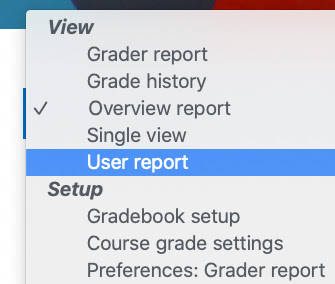
Click here for a Faculty Tutorial.
Questions? Submit a help desk ticket here.